If you've encountered an overage fee and are wondering what it is, you're in the right place!
What is an overage fee?
An overage fee occurs when your usage surpasses the allocated limits of your subscription. Because Ad Badger continuously processes and syncs your campaign data, managing higher spend levels requires additional processing power and database resources. Overage fees help us maintain optimal performance and uninterrupted service for everyone.
How Overage Fees Work
We include a 10% spend buffer on all plans to account for minor fluctuations in Amazon's ad data. You will not incur any overage fee if your total spend remains under 110% of your plan's limit.
When your spend goes beyond 110% of your plan limit, the overage fee is the difference between your current plan and the plan that covers your actual spend, multiplied by 1.1.
-
Formula:
(Correct Plan Price − Current Plan Price) × 1.1 -
Example Scenario:
-
Current Plan: Starter Monthly ($275/month with up to $5,000 spend limit)
-
Actual Spend: $50,000
-
Correct Plan for $50k Spend: Professional Monthly ($660/month, covering up to $75,000 spend)
-
Price Difference: $660.00 − $275.00 = $385.00
-
Overage Fee: $385.00 × 1.1 = $423.50
-
How to Avoid Overage Fees
If your ad spend consistently exceeds your plan limit—or if you expect seasonal spikes—upgrading to a higher plan tier is usually the most cost-effective solution.
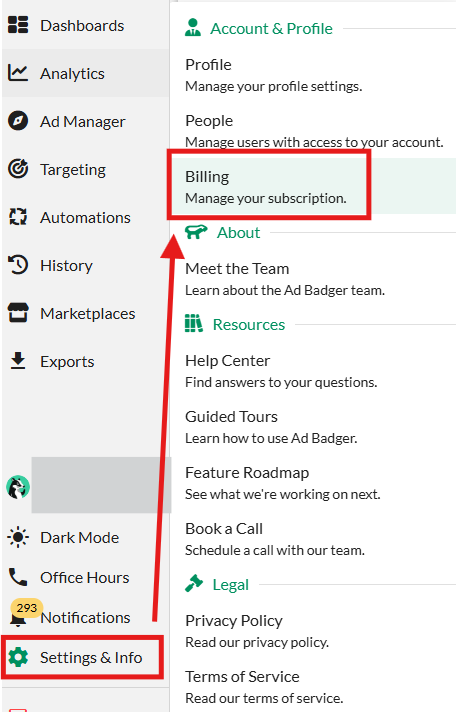
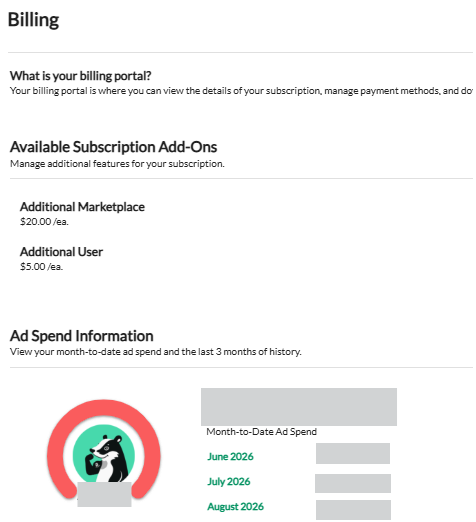
You can check your current ad spend anytime under Settings & Info > Billing. Upgrading ensures a seamless experience without worrying about unexpected charges.
💬 Need Help?
Reach out to our Support Team anytime through the Live Chat bubble in the lower-right corner of the tool.