The N-Gram Explorer is a powerful analytical tool that breaks down your search term data into individual words and short phrases. While a standard search term report shows you the full string a customer typed, N-gram analysis helps you identify the underlying building blocks—the specific words that drive your performance across hundreds of different search terms.
Accessing the N-Gram Explorer
-
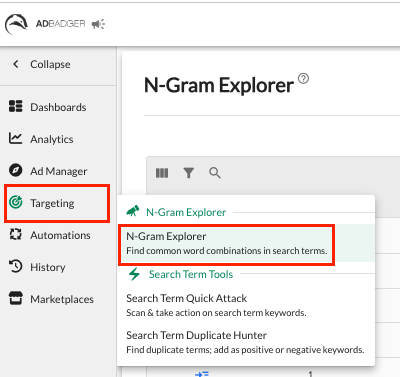
Navigate to the Targeting tab in the left-hand sidebar.
-
Select N-Gram Explorer from the dropdown menu.
What is an N-Gram?
An "N-gram" is a contiguous sequence of n items from a given sample of text. In the context of Amazon advertising, it refers to the number of words in a phrase:
-
1-Gram: Single words (e.g., "bike," "stand," "repair")
-
2-Grams: Two-word combinations (e.g., "bike stand")
-
3-Grams: Three-word combinations (e.g., "mountain bike stand")
-
4-Grams & 5-Grams: Longer phrase strings to track highly specific customer patterns.
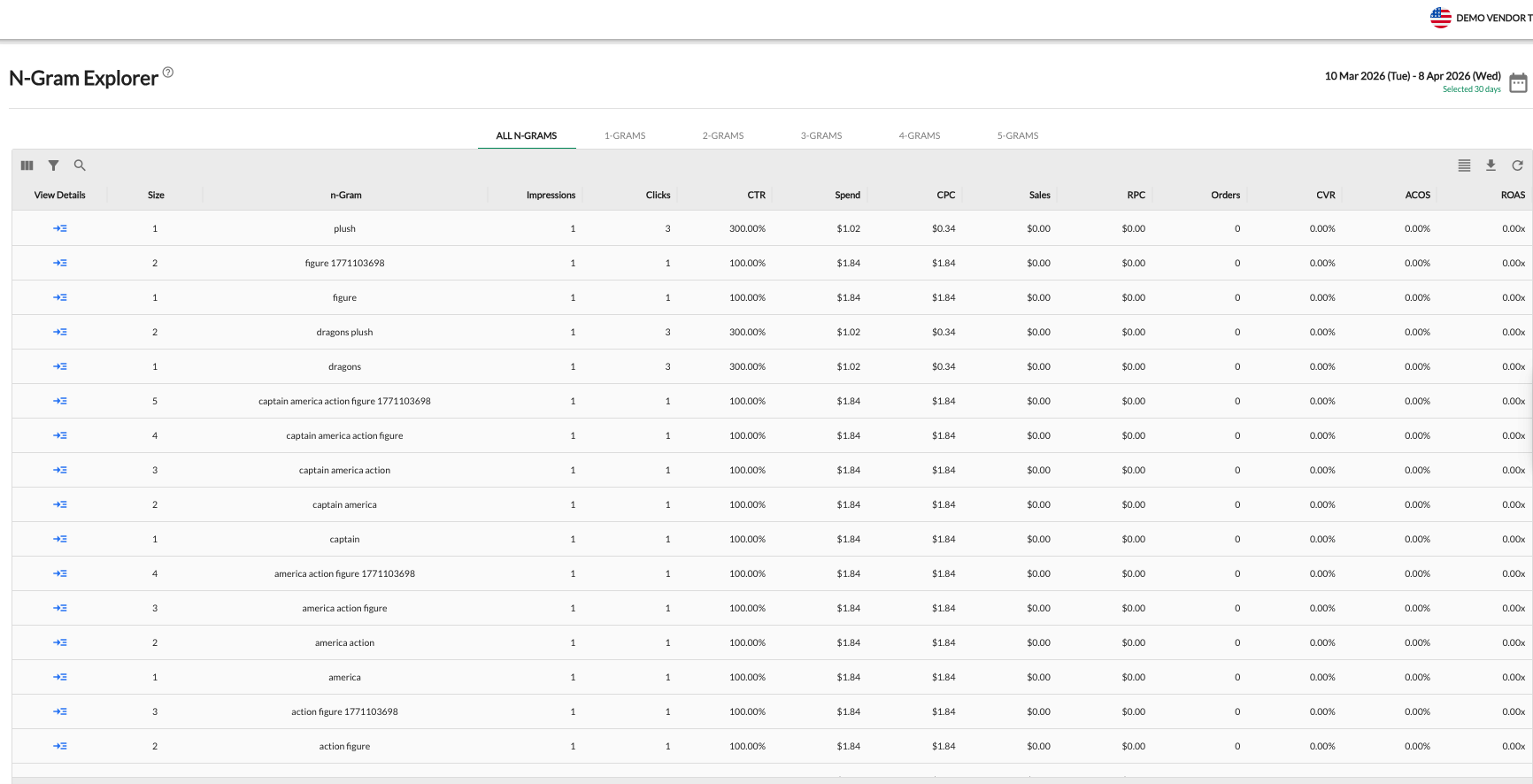
The Explorer allows you to toggle between these views (1-Grams through 5-Grams) using the tabs at the top of the table.
Key Features & Insights
The N-Gram Explorer aggregates data (Impressions, Clicks, Spend, Sales, ACOS, etc.) for every instance a specific word or phrase appears in your search term reports.
1. Identify High-Value Phrases
Use the explorer to find sequences of words that consistently drive high ROAS or low ACOS. If the 2-gram "repair stand" has a significantly higher Conversion Rate (CVR) than the 1-gram "stand," you know that "repair" is a critical qualifying word for your intent-based targeting.
2. Negative Keyword Identification
N-gram analysis is the fastest way to spot "profit bleed." By looking at 1-grams with high spend but zero orders, you can identify irrelevant words that should be added as Negative Phrase matches across your account to prevent wasted spend on hundreds of related search terms.
3. Campaign & Listing Optimization
-
Refine Ad Copy: Incorporate high-performing N-grams into your headlines and bullet points to better align with customer intent.
-
SEO Boost: Use the most relevant N-grams to optimize your product titles and backend search terms, improving your organic visibility.
Strategic Applications
-
Keyword Discovery: Find common sequences customers use to describe your products that you might have missed in your initial keyword research.
-
Refine Broad Match: If a Broad match keyword is performing poorly, use the N-Gram Explorer to see which specific word within that Broad match is causing the low ROAS, then negative that specific word.
-
Scale Winners: Identify 2-gram or 3-gram combinations that are "hidden gems" and promote them to dedicated Exact match keywords in your performance campaigns.
N-Gram Explorer: Stop "Death by a Thousand Clicks" in 5 Minutes
Most Amazon search terms get fewer than 5 clicks individually. On paper, your campaigns look fine, but these fragmented long-tail terms quietly cause "Death by a Thousand Clicks"—where 90% of your non-converting clicks are spread across hundreds of hidden variations, wasting thousands in ad spend.
Standard negative keyword tools miss these because the individual search terms don't hit click thresholds. The N-Gram Explorer fixes this by breaking search phrases down into word components, pooling their cumulative metrics so you can spot the core words bleeding your budget.
Find and Stop the Waste (Monthly Routine)
Run this check once a month to allow enough search term data to collect. Use either strategy to hunt down underperforming keywords:
Option A: Find High Spend with Zero Orders
-
Click the Filter funnel icon, set the rule to
Where Orders Equals = 0, and hit Apply Filter. -
Click the Spend column header to sort from highest to lowest.
-
Identify single words or phrases with heavy clicks and zero conversions.
Option B: Find High ACOS Bleeders
-
Clear your filters. Click the ACOS column header to sort from highest to lowest.
-
Spot n-Grams with highly unprofitable percentages (e.g., a single word like "that" racking up a 1720% ACOS across the account).
🛠️ Step 4: Manually Block the Bad Search Terms
Once you locate a wasteful n-Gram building block, eliminate the underlying search phrases instantly:
-
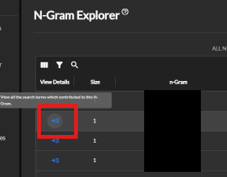
Click the blue arrow icon (View Details) to the left of the wasteful n-Gram to see every real customer query containing that word.
-
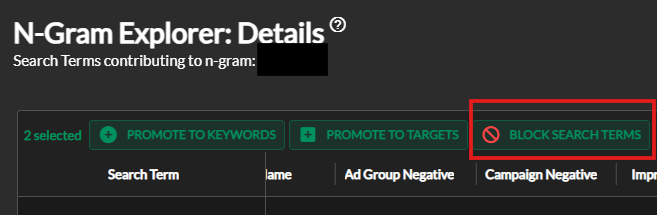
Check the boxes next to the specific search terms driving the budget leak.
-
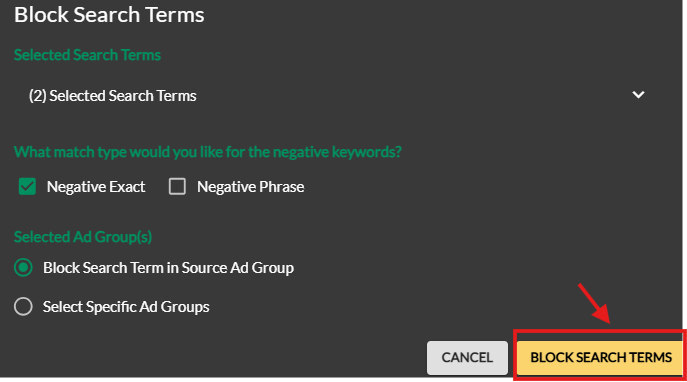
Click the red BLOCK SEARCH TERMS button at the top of the table.
-
Select your preferred match type (Negative Exact or Negative Phrase), choose your target ad groups, and click BLOCK SEARCH TERMS to finalize.
📈 Pro-Tip: Promote Hidden Winners
Don't just look for negatives. Toggle to the Trigram (3-Gram) tab and sort by Sales. Identify high-performing three-word phrases (like "toys for puppies") that you might have missed, and promote them to dedicated Exact Match keywords or use them to optimize your product page copy for an SEO boost.
💬 Need Help?
Reach out to our Support Team anytime through the Live Chat bubble in the lower-right corner of the tool.