The Daily Pulse dashboard is a quick, near real-time view of your Amazon sales: today so far, yesterday, this month, and last month, all on one screen. It's built to be left open in a tab so you can watch the day come in.
Daily Pulse is for Seller Central profiles. For each period you get sales, orders, units, ad spend, ACOS and TACOS, each compared with the period before.
Open it here: app.adbadger.com/#/dashboard/daily_pulse
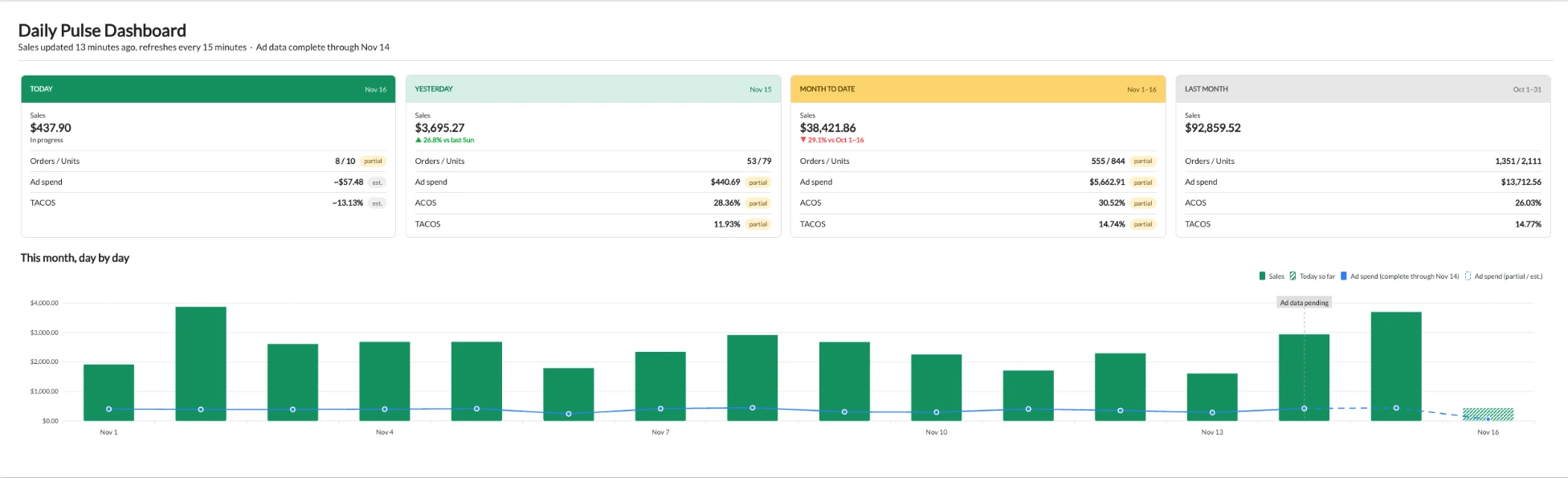
Where do the numbers come from?
- Sales, orders and units come from data similar to what you see in Amazon's Business Reports in Seller Central.
- Ad spend and ACOS come from data similar to what you see in Amazon's Advertising console.
- TACOS combines the two: ad spend from the advertising data divided by total sales from the sales data.
So if you want to compare against Amazon, Business Reports is the closest match for sales, and the Advertising console is the closest match for ad spend and ACOS.
What counts as a sale?
- Sales, orders and units are counted on the day the order is placed, not the day it ships.
- A day runs midnight to midnight in the marketplace's time zone, not yours. For the US marketplace that's Pacific time, so if you're on the East Coast, "today" starts and ends at 3 a.m. your time.
- Orders and units are different counts. One order with three of the same product is 1 order and 3 units.
- One marketplace at a time. The numbers are for the marketplace shown at the top right of the dashboard, not all your marketplaces added together.
How fresh is the data?
The line under the title tells you exactly:
- Sales updated X minutes ago, with a countdown to the next refresh. Sales refresh every 15 minutes, so you can see exactly when the next update will land. Sales, orders and units come in through the day.
- Ad data complete through [date]. Amazon's advertising reports run about two days behind, so ad spend, ACOS and TACOS for the most recent days are still filling in.
The four cards

| Card | What it shows |
|---|---|
| Today | Sales so far (marked In progress), orders / units, an estimated ad spend and an estimated TACOS. |
| Yesterday | Full-day sales, with the change versus the same weekday last week (for example "vs last Sun"). Also orders / units, ad spend, ACOS and TACOS. |
| Month to date | Sales from the 1st through today, compared with the same days last month. Plus orders / units, ad spend, ACOS and TACOS. |
| Last month | The full previous month's totals, already settled. |
What the small tags mean:
- partial: the number covers only the data Amazon has delivered so far. It will go up as the rest arrives.
- est.: an estimate, used for today's ad spend and TACOS because Amazon's report for today is still filling in.
A quick reminder on the two ad metrics:
- ACOS = ad spend ÷ sales that came from ads.
- TACOS = ad spend ÷ all sales (ad and organic).
The "This month, day by day" chart

- Green bars are each day's sales. Today's bar is hatched because the day isn't over.
- The solid blue line is ad spend for days where Amazon's ad data is complete.
- The dashed blue line is ad spend that is still partial or estimated.
- The Ad data pending marker shows where complete ad data stops.
Why the last few days don't match Amazon exactly
Amazon data from the last couple of days is always settling. Orders get cancelled or confirmed, ad clicks and sales get attributed, and reports catch up at different speeds.
Amazon's own reports also count things differently. The Advertising console, the SKU Economics report and the Business Reports dashboard each use their own attribution settings and timing, so they can show slightly different numbers for the same day, even inside Seller Central. That's why we point to Business Reports for sales and the Advertising console for ad numbers when you compare.
So a small gap between Daily Pulse and Amazon for recent days is normal. Give it a couple of days and the numbers settle. For closed-out periods, use the Last month card or your full reports. For more on attribution windows and Amazon's reporting delay, see Why is Data Different in Ad Badger than Amazon?
If a number still looks wrong after a couple of days, message us in the chat and we'll take a look.