Our Black Friday codes take money off your first term of an Ad Badger plan. They work until Monday, November 30, 11:59 PM Central Time.
| Code | What you get |
|---|---|
| BF30 | 30% off the first year of a Yearly plan |
| BF10 | 10% off the first 6 months of an Every 6 months plan |
After that first year (or first 6 months), your plan renews at the normal price.
Anyone can use them: new customers, people on a trial, and current customers. They work in any currency, with no minimum. The codes apply to plans only, not add-ons.
Badger Vault (our AI skills, $250/month on their own) is included with every Ad Badger plan.
Full offer: adbadger.com/black-friday
⚠️ Pick Yearly or Every 6 months first
The code works on whatever billing cycle you pick, monthly included. On a monthly plan it only takes 30% (or 10%) off one month.
So choose Yearly before you enter BF30, or Every 6 months before you enter BF10.
What it costs with the code
BF30, Yearly:
| Plan | Normal price | With BF30 |
|---|---|---|
| Starter | $2,550 | $1,785 |
| Basic | $4,080 | $2,856 |
| Professional | $6,120 | $4,284 |
| Platinum | $8,500 | $5,950 |
BF10, Every 6 months:
| Plan | Normal price | With BF10 |
|---|---|---|
| Starter | $1,500 | $1,350 |
| Professional | $3,600 | $3,240 |
Current customers and trials
-
Log in to Ad Badger and go to Settings → Billing (app.adbadger.com/#/settings/billing).
-
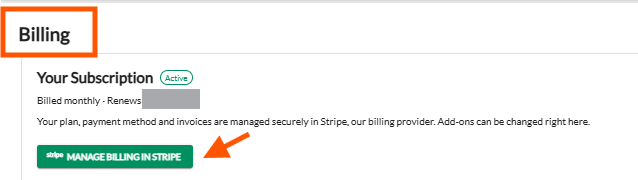
Click Manage Billing in Stripe, under Your Subscription.
-
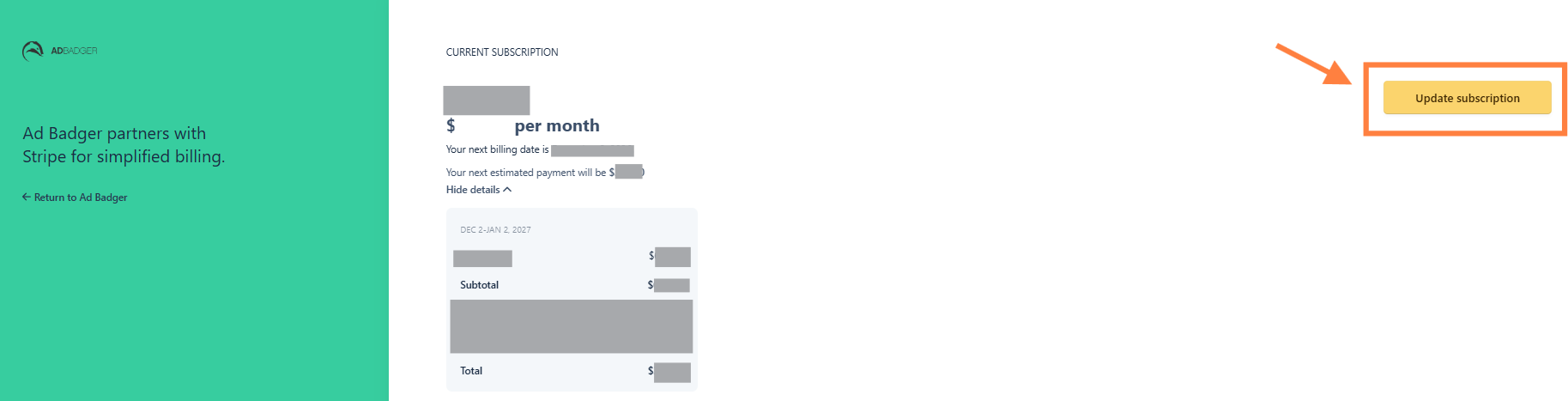
Click Update Subscription.
-
Choose Yearly (for BF30) or Every 6 months (for BF10), and the plan you want.
-
Enter BF30 or BF10 in the promotion code field.
-
Check the amount on the confirmation screen, then confirm.
On a trial? Your trial keeps running. You won't be charged today, and the discounted price is charged when your trial ends.
Have add-ons, like an extra marketplace or user? You can't change your plan or add a code yourself while they're on your subscription. Message us in the chat and we'll make the switch for you.
For more on changing plans, see How to Change Your Subscription Plan.
Already on a Yearly plan?
You can't add a code to a yearly plan that's already running, so we handle it for you. We lock in your next year now, at the Black Friday price.
- What you pay: your plan's yearly price with 30% off (BF30). Add-ons, like an extra marketplace or user, stay at their normal price.
- When: we charge the card on file when we set it up. We'll tell you exactly what we're going to do and the amount before we charge anything.
- Your current year: runs to its normal end date. Nothing changes.
- Your next renewal: shows $0, because that year is already paid. You don't lose any time.
To ask, email us or message us in the chat before Monday, November 30, 11:59 PM Central Time.
New customers
- Go to adbadger.com/pricing.
- Pick your plan and choose Yearly or Every 6 months.
- Enter BF30 or BF10 at checkout.
Using Buy Box Checker too?
Buy Box Checker has its own code: BBC25 takes 25% off for 12 months on the Scout, Patrol and Badger Pro plans. Enter it at checkout on buyboxchecker.com. Same deadline: Monday, November 30, 11:59 PM Central Time.
💬 Stuck?
Message us in the chat and we'll switch your plan over for you.